















































Copy an Existing Call Flow
Copying a Call Flow duplicates all settings, steps, and configurations from an existing Call Flow into a new one. This saves time when you need similar routing for multiple profiles or want to create variations of an existing flow.
Copy a Call Flow to Another Profile
To copy an existing Call Flow:
- Go to "Tracking" from the top menu and select "Calls".
- Choose "Call Flows".
- Find the Call Flow you want to copy and hover your mouse over it.
- Click "Copy Call Flow" when the option appears.
- Under "Select Account", choose the account where you want to copy the Call Flow.
- Under "Select Profile", choose the destination profile:
- Specific Profile: Select one profile from the dropdown
- All Profiles: Copy the Call Flow to all profiles in the selected account
- Optionally, configure copy options:
- Check "Assign all numbers in selected profiles to this copied call flow" to automatically assign the copied Call Flow to all tracking numbers in the destination profile(s)
- Check "Send me an email when call flows have been copied" to receive a notification when the copy is complete
- Check "Click to confirm copying this call flow to selected profiles" to acknowledge the copy action
- Click "Copy Call Flow" to complete the process.
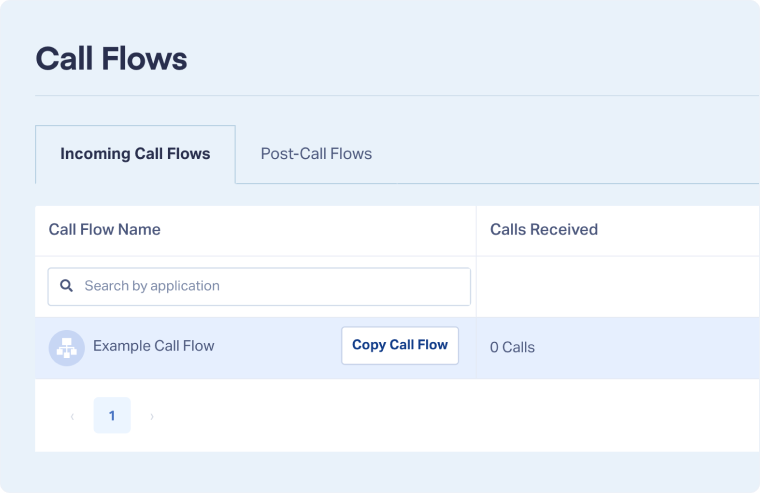
The Call Flow will be copied to the selected profile(s) with all steps, settings, and configurations intact.
Tip: Use the "Assign all numbers" option when you want the copied Call Flow to immediately take effect on all tracking numbers in the destination profile. Otherwise, you'll need to manually assign it to numbers.
When to Copy Call Flows
Copy Call Flows when you need to:
- Replicate routing across multiple client profiles: Agencies can create a standard Call Flow and copy it to all client profiles.
- Create variations of existing flows: Start with a working Call Flow and modify the copy for different scenarios (business hours vs. after-hours).
- Migrate settings to new profiles: When adding new profiles, copy proven Call Flows instead of rebuilding from scratch.
- Test changes without affecting live flows: Copy a production Call Flow, make changes, and test before updating the original.
Related Topics
Was this page helpful?
Get a FREE presentation of WhatConverts
One of our marketing experts will give you a full presentation of how WhatConverts can help you grow your business.
Schedule a Demo






