















































Understand the Ask AI Lead Intelligence Rules
Who has access to this feature?
Available on: Elite Plans
Access level: All Users
Ask AI Lead Intelligence Rules let you ask custom questions about your lead interactions that AI answers automatically. Instead of using pre-built analysis features, you define exactly what you want to know about each call, form, or chat, then AI extracts that information and stores it in Lead Analysis fields.
Once you've learned what AI-powered rules are, understanding how Ask AI works helps you build rules that extract the specific insights your business needs.
How It Works
Ask AI rules operate on the same IF/THEN structure as standard Lead Intelligence, but the THEN action prompts AI to analyze lead content and answer your questions.
The Ask AI Action Type
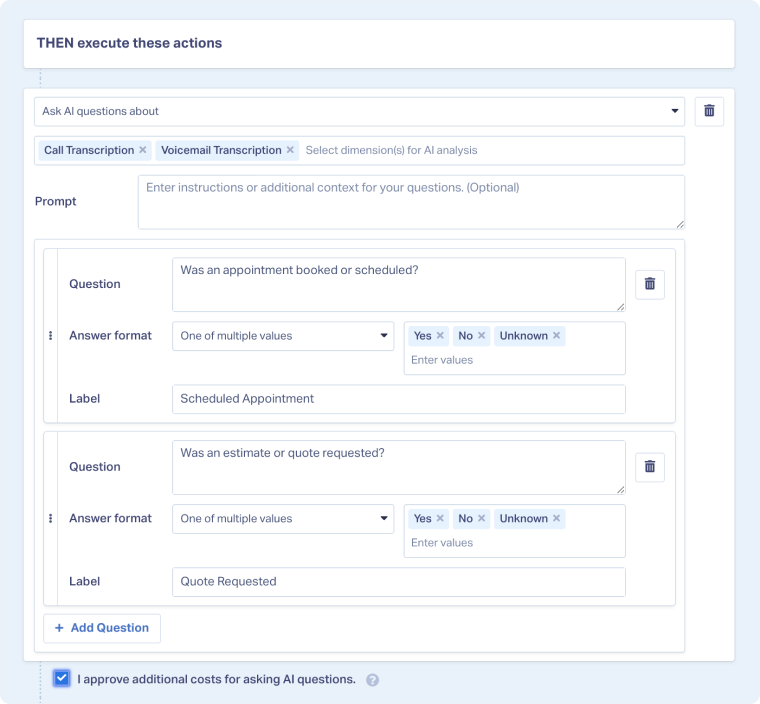
When you select "Ask AI questions about" as your action type, you configure:
- Dimensions to analyze: Which fields AI should read (Call Transcription, Voicemail Transcription, Form Message, etc.)
- Question: The specific question you want AI to answer about the content
- Label: How the answer field will appear in Lead Manager (becomes a Lead Analysis field)
- Answer format: The type of response AI should provide
- Optional prompt: Additional context or instructions for AI
Available Answer Formats
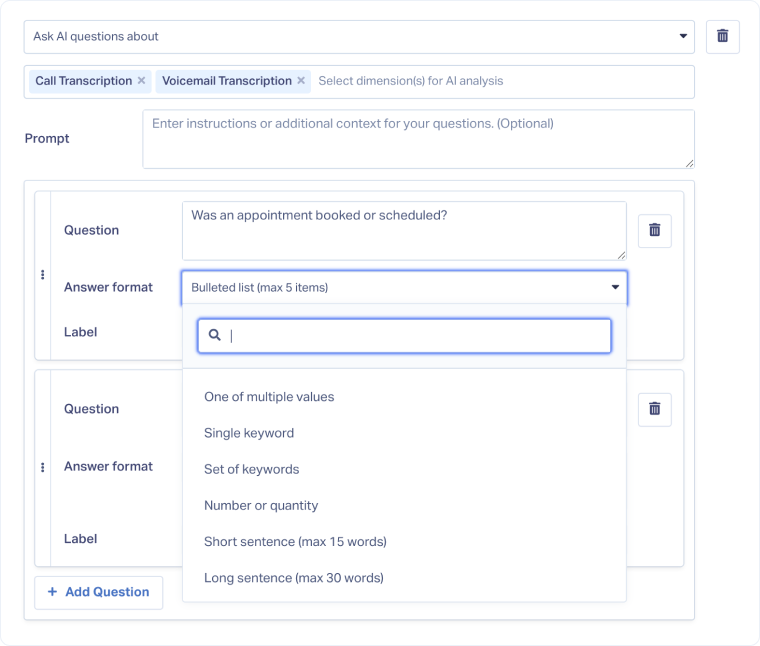
AI can respond in several formats depending on your needs:
- One of multiple values: Choose from predefined options you provide (e.g., Yes, No, Unknown)
- Single keyword: Extract one specific term or phrase mentioned
- Set of keywords: Extract multiple specific terms or phrases mentioned
- Number or quantity: Numeric values extracted from conversation
- Short sentence (max 15 words): Very brief responses
- Long sentence (max 30 words): Concise explanations
- Short paragraph (max 40 words): Brief explanations or summaries
- Long paragraph (max 80 words): Detailed analysis or comprehensive summaries
How AI Processes Your Questions
When a lead meets your rule's conditions:
- AI reads the specified dimensions (transcription, message, etc.)
- AI considers your question and any additional prompt context
- AI analyzes the content and formulates an answer in the requested format
- The answer is stored in a custom field with your specified label
- You can view the answer in Lead Manager, use it in reporting, or trigger additional rules based on it
Common Ask AI Use Cases
Qualification Questions
Appointment Scheduling: "Was an appointment booked or scheduled?"
- Answer format: One of multiple values (Yes, No, Unknown)
- Label: Appointment Scheduled
Quote Requests: "Did the customer request a quote or estimate?"
- Answer format: Yes/No
- Label: Quote Requested
Service and Product Identification
Service Type: "What products or services is the customer interested in?"
- Answer format: Set of keywords
- Label: Products Mentioned
Project Scope: "Briefly describe what the customer wants done"
- Answer format: Short answer
- Label: Project Description
Sales Performance Analysis
Objection Handling: "Did the caller raise any objections, and if so, how were they addressed?"
- Answer format: Short answer
- Label: Objections and Responses
Next Steps: "What follow-up actions were agreed upon?"
- Answer format: Short answer
- Label: Agreed Next Steps
Intent and Urgency
Timeline: "How soon does the customer need service?"
- Answer format: One of multiple values (Immediate, This Week, This Month, Unknown)
- Label: Service Timeline
Buying Intent: "On a scale of 1-10, how likely is this customer to purchase based on the conversation?"
- Answer format: Number
- Label: Purchase Intent Score
Other Ways to Use Ask AI Rules
- Chain multiple questions together in a single rule to build comprehensive lead profiles
- Use conditional logic to ask different questions based on lead characteristics
- Combine with standard actions to both ask AI questions and set quotable status or lead scores simultaneously
- Create tiered questioning where simple Yes/No answers trigger follow-up questions with more detailed analysis
- Export AI answers via API or webhooks to populate CRM fields with conversation insights
Related Topics
Get a FREE presentation of WhatConverts
One of our marketing experts will give you a full presentation of how WhatConverts can help you grow your business.
Schedule a Demo






