















































Import Existing Lead Intelligence Rules From a Different Profile
Who has access to this feature?
Available on: Elite Plans
Access level: All Users
Importing an existing Lead Intelligence rule lets you reuse automation logic you've already built in another account or profile. This saves time when you need the same rule across multiple accounts or profiles and ensures consistency in how leads are qualified, scored, or updated.
Import an Existing Lead Intelligence Rule
To import a Lead Intelligence rule from another profile:
- Access the Master Account or Profiles settings depending on where you want to apply rules.
- Click "Lead Intelligence" from the menu.
- Click "+ Add Intelligence Rule".
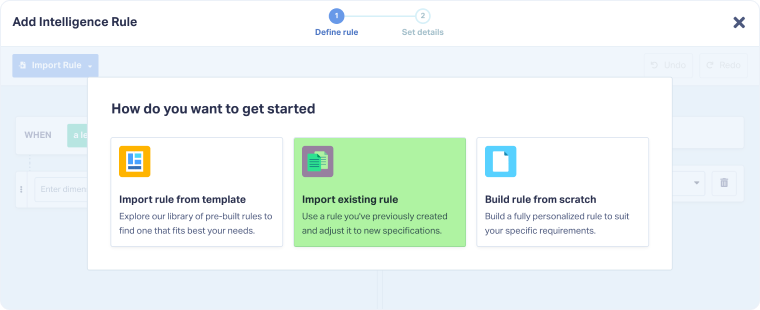
- Select "Import existing rule" from the options.
- In the Import existing rule modal, select your "Master Account" from the dropdown.
- Select the "Account" where the rule exists.
- Select the "Profile" that contains the rule you want to import.
- You'll see all Lead Intelligence rules from the selected profile displayed as cards. Click the rule card you want to import (e.g., Spam leads, Quotable chat leads).
- Review your selection (the selected rule will appear highlighted).
- Click "Import" to add the rule to your current profile.
Tip: After importing, the rule becomes a new, independent copy in your profile. You can customize it without affecting the original rule in the source profile.
Related Topics
Was this page helpful?
Get a FREE presentation of WhatConverts
One of our marketing experts will give you a full presentation of how WhatConverts can help you grow your business.
Schedule a Demo






