


Understand Facebook Ads Advanced Matching
Facebook Ads Advanced Matching helps you send offline conversions back to Facebook even when leads don't have a Facebook click identifier. By matching leads using hashed phone numbers or email addresses, Advanced Matching captures conversions that would otherwise go untracked, improving Facebook's optimization algorithm and your campaign performance.
Learn more about setting this up in Set Up Facebook Tracking
What is Advanced Matching?
Advanced Matching works similarly to Google's Enhanced Conversions. When a lead converts on your website or calls your business, WhatConverts sends the conversion data back to Facebook along with a hashed (encrypted) phone number or email address. Facebook then matches this data to a Facebook user profile to attribute the conversion to the correct ad campaign.
This is especially valuable for offline conversions, which don't automatically include Facebook's click identifier (fbclid).
How Advanced Matching Works
When you enable Advanced Matching in your Facebook Integration settings, WhatConverts automatically:
- Captures the lead's contact information. When a lead converts (via form, phone call, chat, etc.), WhatConverts records their phone number or email address.
- Hashes the data. The phone number or email address is encrypted using SHA-256 before being sent to Facebook (Facebook never receives plain-text contact information).
- Sends the conversion to Facebook. WhatConverts sends the conversion event along with the hashed identifier to Facebook's Conversions API.
- Matches the lead to a Facebook user. Facebook compares the hashed data to its user database to potentially attribute the conversion to the correct ad campaign.
- Optimizes your campaigns. Facebook's algorithm uses this conversion data to find more qualified prospects and improve bidding.
Conversions sent through this method show Advanced Matching as the status in the Facebook Ads Conversion column.
Benefits of Advanced Matching
- Capture offline conversions: Track phone calls, in-store visits, and other offline actions that don't include a Facebook click identifier
- Improve campaign optimization: More conversion data means Facebook's algorithm can better optimize for leads that matter to your business
- Recover lost attribution: Match conversions to campaigns even when tracking cookies are blocked, or users switch devices
- Increase conversion volume: Sending more conversions back to Facebook gives the algorithm more data to work with, especially important for smaller campaigns
What Data is Sent?
When Advanced Matching is enabled, WhatConverts sends the following hashed (encrypted) customer information parameters to Facebook:
- Email address (em)
- Phone number (ph)
Facebook uses these hashed identifiers to match conversions to user profiles. No plain text personal information is ever sent to Facebook, all data is encrypted using hashing before transmission.
For more details on how Facebook uses Advanced Matching data, see Facebook's Advanced Matching documentation.
Enable Advanced Matching
Advanced Matching can be enabled during your initial Facebook Integration setup, as it takes you through the steps. If you didn't enable it initially or want to change your settings:
- In your WhatConverts profile, go to ”Tracking” and select “Integrations”.
- Find Facebook Ads and click “View Details”.
- Click “Edit Connection”.
- Under Send all leads with advanced matching?, select “Yes”.
- Click “Update Connection”.
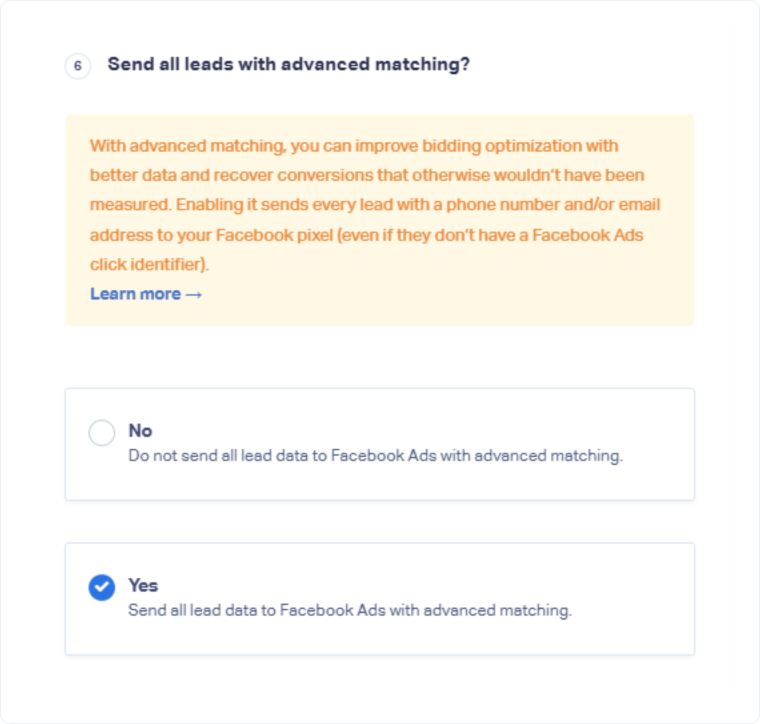
Once enabled, all qualifying leads will be sent to Facebook with Advanced Matching data.
Related Topics
Get a FREE presentation of WhatConverts
One of our marketing experts will give you a full presentation of how WhatConverts can help you grow your business.
Schedule a Demo






