


Set Up Unbounce Call Tracking
WhatConverts can track phone calls from your Unbounce landing pages and capture complete marketing attribution for each call. By installing the WhatConverts tracking code on your Unbounce pages, you'll see which landing pages and campaigns drive phone calls.
Before You Begin
Before you can track calls from Unbounce, you'll need:
- An active WhatConverts account with call tracking enabled
- An Unbounce account with published landing pages
- At least one WhatConverts tracking number set up
- Your WhatConverts tracking code
Add Tracking Code to Unbounce
Once you have retrieved your WhatConverts tracking code, install it on your Unbounce pages:
- Log in to your Unbounce account.
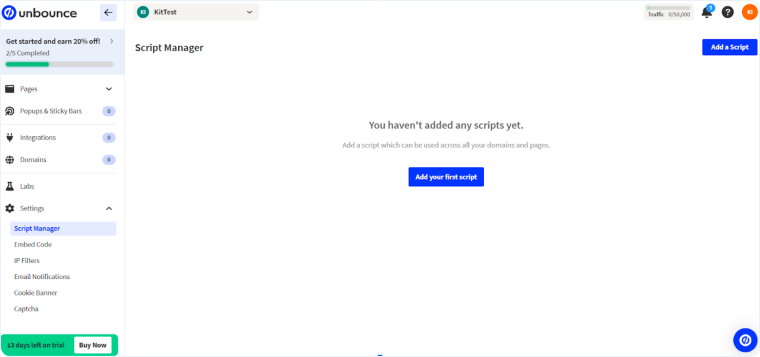
- Select “Settings”, then “Script Manager” on the left sidebar.
- Click "Add your first script" or “Add a Script”.
- Choose “Custom Script” from the dropdown and name it something like “WhatConverts”.
- Set Placement to "Head" and Included On to “All”.
- Add the WhatConverts tracking script to the code box.
- Click "Save and Publish Script".
Configure Number Swapping
Follow the steps in our Create a Dynamic Number Pool for All Traffic to set up a Number Pool.
When visitors land on your Unbounce page, WhatConverts will automatically replace your business number with the tracking number. When someone calls the tracking number, WhatConverts captures the call and marketing attribution, then forwards the call to your business.
Test Your Setup
Follow these steps to verify call tracking is working:
- Visit your Unbounce landing page.
- Verify that your phone number has been swapped with a tracking number.
- Call the tracking number from your mobile phone.
- Log in to your WhatConverts account.
- Access the Lead Manager.
- Verify the test call appears in your Lead Manager.
Related Topics
Get a FREE presentation of WhatConverts
One of our marketing experts will give you a full presentation of how WhatConverts can help you grow your business.
Schedule a Demo






