


Track Bing Ads Call Extensions
Bing Ads Call Extensions allow potential customers to call your business directly from search results. By using a WhatConverts tracking number as your call extension number, you can track and record these calls while Microsoft Advertising handles conversion attribution.
Learn more in What is the Bing Ads Integration?
Note: WhatConverts will track and record all phone calls generated from your Bing Ads call extension, but Microsoft Advertising will natively record the conversion. WhatConverts does not send call extension conversions back to Bing Ads.
Add a Bing Ads Call Extension Tracking Number
Follow these steps to create a tracking number for your Bing Ads call extension:
- From your WhatConverts Profile, click “Tracking” in the top menu.
- Select “Calls”, then “Phone Numbers”.
- Click “+ Add Phone Number”.
- Select “Advanced Setup”.
- Choose “Bing Ads Extension” as the tracking type.
- Click “Next Step”.
- Move the slider to 1 (you only need one number for call extensions). Choose your Country, Phone Number Type (Local or Toll Free), and Area Code. Click “Find Numbers”.
- Review the available number and click “Next Step”.
- Enter the Destination Number where you want calls forwarded.
- Name your phone number "Bing Ads Call Extension" (or a similar descriptive name).
- Click “Next Step”.
- Configure your additional tracking features:
- Call recording
- Call whisper
- Voicemail detection
- Other tracking features
- Click “Finish” to create your tracking number.
Optionally, define alternative attribution by adding custom source, medium, campaign, content, or keyword values to override default attribution for these calls.
Copy the WhatConverts tracking number; you'll need it in the following steps.
Add the Tracking Number to Bing Ads
Follow these steps to add your WhatConverts tracking number to your Bing Ads call extension:
- Log in to your Microsoft Advertising account.
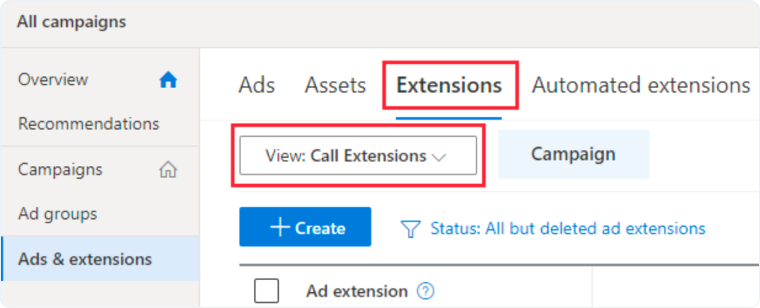
- Click “Ads & extensions” from the top menu.
- Click the “Extensions” tab.
- Click the “View” dropdown and select “Call Extensions”.
- Check the box next to the call extension you want to update.
- Click the “Edit” dropdown and select “Edit Call Ad Extension”.
- In the Phone Number box, paste the WhatConverts tracking number you created in the previous steps.
- Select the radio button for "Yes, I would like to track my calls using a Microsoft Advertising forwarding number".
- Click “Save”.
Note: Once configured, WhatConverts will track and record all calls from your Bing Ads call extensions, while Microsoft Advertising handles conversion tracking on their platform.
Related Topics
Get a FREE presentation of WhatConverts
One of our marketing experts will give you a full presentation of how WhatConverts can help you grow your business.
Schedule a Demo






