


Receive SMS Messages on Your Mobile Phone with Zapier
WhatConverts can send SMS notifications to your mobile phone using Zapier to alert you when new leads come in.
This article will walk you through how to set up a Zap that sends SMS messages from WhatConverts to your mobile device.
Before You Begin
Before you can set up this integration, you'll need:
- An active WhatConverts account
- A Zapier account
- Access to a mobile phone number that can receive SMS messages
- Zap Template: https://zapier.com/shared/daa3300c7727e170d30adcebc558cbfa6e9a05b6
Note: Numbers from T-Mobile are not supported due to updated policies from the carrier. You can read more about it in Zapier's update here.
Set Up the Zap
Follow these steps to create a Zap that sends SMS notifications for new WhatConverts leads:
- Log in to your Zapier account and create a new Zap.
- Select WhatConverts as your Trigger App.
- Select "New Lead" as your Trigger Event and click "Continue".
- Connect your WhatConverts account to Zapier (see our Connecting to Zapier article for detailed instructions).
- On the Set up trigger page:
- Under Choose a Lead Type, select "Yes" for Text Messages
- For all other lead types (Calls, Web Forms, Chats, Transactions), select "No"
- Select your WhatConverts profile from the dropdown menu.
- Click "Continue" to test your trigger.
During this step, you can send a new SMS message to your WhatConverts tracking number to generate test data. - Review the test data and click "Continue".
- Select SMS by Zapier as your Action App.
- Select "Send SMS" as your Action Event and click "Continue".
- Connect your mobile phone number to Zapier.
You must have access to the phone number to receive the verification code - On the Set up action page:
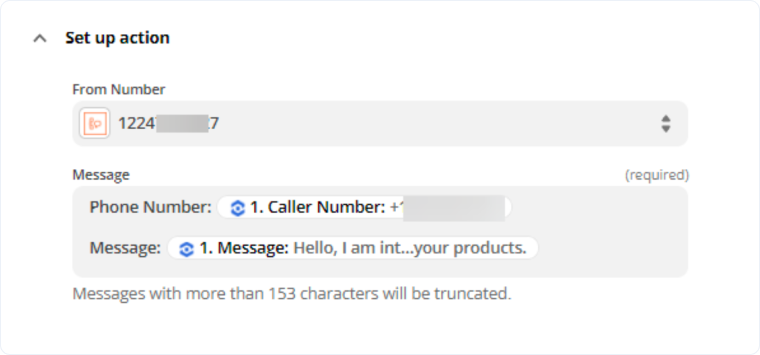
- Under Phone Number, insert the "Caller Number" field from WhatConverts
- Under Message, insert the "Message" field from WhatConverts
- Click "Continue" to test your action.
- Review the test SMS and click "Publish Zap" to activate.
Once activated, you'll receive an SMS notification on your mobile phone every time a new text message lead is received in WhatConverts.
Related Topics
Get a FREE presentation of WhatConverts
One of our marketing experts will give you a full presentation of how WhatConverts can help you grow your business.
Schedule a Demo






