


Set Up Weebly Tracking
Add WhatConverts tracking to your Weebly website to track all conversions: phone calls, form submissions, and chats.
Learn more about what this integration offers in What is the Weebly Integration?
Before You Begin
Make sure you have:
- A Weebly website with access to edit the header code
- Your WhatConverts tracking script
- A Weebly plan that allows custom code (Pro, Business, or Performance plans)
Add the WhatConverts Tracking Script
- Log in to your Weebly account.
- Select the website you want to edit.
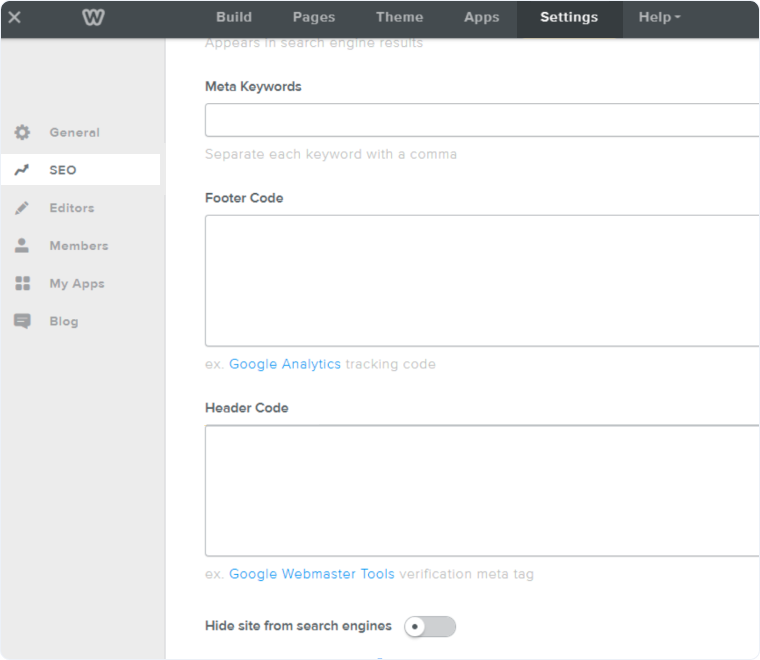
- Click "Settings" in the top navigation.
- Select "SEO".
- Find the "Header Code" section.
- Paste your WhatConverts tracking script in the "Header Code" field.
- Click "Save" to make changes live.
Verify Tracking Installation
- Visit your published website.
- Right-click and select "Inspect".
- Click the Application tab and check the website to see if the wc_ cookies have appeared, such as: wc_client and wc_client_current
Track Phone Calls from Your Weebly Website
Follow the steps in our Create a Dynamic Number Pool for All Traffic to set up a Number Pool.
When visitors land on your Weebly page, WhatConverts will automatically replace your business number with the tracking number. When someone calls the tracking number, WhatConverts captures the call and marketing attribution, then forwards the call to your business.
Track Forms on Your Weebly Website
Weebly forms require special configuration. For detailed form tracking instructions, see Set Up Weebly Form Tracking
Related Topics
Get a FREE presentation of WhatConverts
One of our marketing experts will give you a full presentation of how WhatConverts can help you grow your business.
Schedule a Demo






