


Set Up Shopify Tracking
Set up the tracking script and transaction tracking for your Shopify store.
Learn more about what this integration offers in What is the Shopify Integration?.
Install the WhatConverts Shopify App
- Install the WhatConverts app from the Shopify App Store.
- Select the WhatConverts Account you'd like to use for tracking.
Copy Your Profile ID
- From your WhatConverts dashboard, click the "Tracking" menu.
- Click "Tracking Code."
- Copy your five-digit Profile ID.
Connect Your Profile to Shopify
- In Shopify, paste your Profile ID into the WhatConverts app "Manage Tracking" page.
- Click "Save."
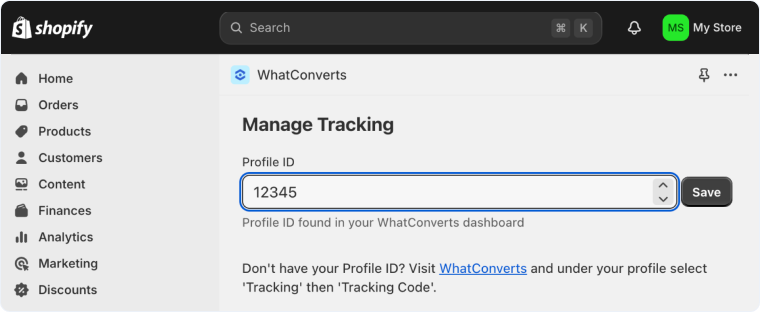
Once saved, the WhatConverts tracking script will be generated on your website. Your account is now ready to start tracking transactions and calls from your Shopify store.
Track Draft Orders
- On the Manage Tracking page for WhatConverts, you will find a checkbox underneath the Profile ID for "Tracking Draft Orders".
- Check the box, then click "Save."
Related Topics
Was this page helpful?
Get a FREE presentation of WhatConverts
One of our marketing experts will give you a full presentation of how WhatConverts can help you grow your business.
Schedule a Demo






