


Understand Discrepancies Between WhatConverts and Facebook Ads
If your conversion totals in Facebook Ads (Meta) do not match the lead data in WhatConverts, the difference is typically caused by how each platform attributes, counts, or receives event data. This article explains the most common causes and what information is needed to resolve the discrepancy.
Attribution windows are causing timing differences
Meta may attribute a conversion to an ad click from up to 7 days ago, while WhatConverts records the lead at the exact time the form was submitted or the call was made. This difference in attribution logic can cause totals to appear mismatched even when both platforms are working correctly.
How to troubleshoot attribution window discrepancies
To troubleshoot this issue:
- In Meta Ads Manager, open your campaign reporting and review the active attribution window setting.
- Compare the date range and attribution window in Meta against the corresponding date range in your WhatConverts Lead Manager.
- Adjust the comparison date range to account for the attribution window and recheck the totals.
Deduplication is not configured correctly between the Meta Pixel and Conversions API
If both the Meta Pixel and the Conversions API are active but deduplication is not properly configured, Meta may overcount or undercount events compared to WhatConverts.
How to troubleshoot deduplication issues
To troubleshoot this issue:
- Open Meta Events Manager and select your data source.
- Review whether both the Meta Pixel and Conversions API are sending the same events.
- Confirm that event deduplication is enabled and that matching event names and event IDs are being passed from both sources.
- Contact WhatConverts Support if deduplication settings need to be reviewed in your integration.
Browser privacy protections are blocking the Meta Pixel
Browser-level tracking blockers or iOS App Tracking Transparency (ATT) can prevent the Meta Pixel from firing, causing Meta to undercount events. WhatConverts typically captures lead data directly and is not affected by these restrictions in the same way.
How to troubleshoot pixel blocking issues
To troubleshoot this issue:
- In Meta Events Manager, select your Pixel data source and review the event activity log for drops or gaps in event volume.
- Compare Pixel-only event counts against Conversions API event counts to identify where data loss is occurring.
- If Pixel events are significantly lower than expected, consider routing more conversion data through the Conversions API, which is less affected by browser privacy restrictions.
The support team needs additional information to diagnose the discrepancy
For cases where the cause is not immediately clear, the WhatConverts Support team requires a screenshot of your Events Overview page in Meta Events Manager for the current month.
Your screenshot must include:
- The total event activity for your Pixel or Conversions API data source.
- The visible date range selector to confirm the timeframe being reviewed.
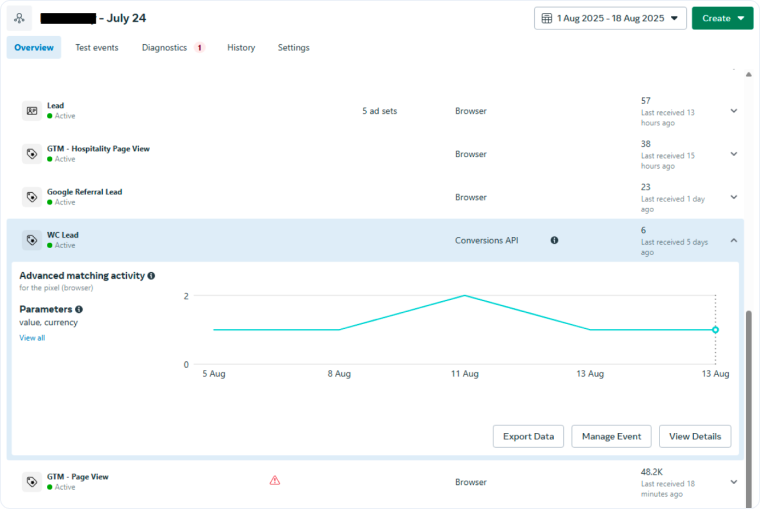
How to locate the Events Overview page in Meta
To troubleshoot this issue:
- Log in to your Meta Business Suite and click the menu icon then select "Events Manager".
- Select the specific Pixel or Conversions API data source you are using to track WhatConverts leads.
- Set the date range selector in the top right to the current month.
- Take a screenshot that includes both the event activity totals and the date range selector.
- Share the screenshot with the WhatConverts Support team.
Related Topics
Get a FREE presentation of WhatConverts
One of our marketing experts will give you a full presentation of how WhatConverts can help you grow your business.
Schedule a Demo






