


Troubleshoot Caching Issues (WP Rocket)
If your tracking code is installed but leads are not appearing in your Lead Manager or phone numbers are not swapping correctly, WP Rocket may be minifying or deferring the WhatConverts tracking script before it can load. This article explains how to exclude the WhatConverts script from WP Rocket's optimization settings to restore accurate lead tracking.
WP Rocket is minifying or deferring the WhatConverts tracking script
WP Rocket's JavaScript optimization features can prevent the WhatConverts tracking script from loading correctly. When the script is minified, deferred, or delayed, lead attribution and number swapping may stop working entirely.
How to exclude the tracking script from WP Rocket
To troubleshoot this issue:
- Log in to your WordPress dashboard and open WP Rocket settings.
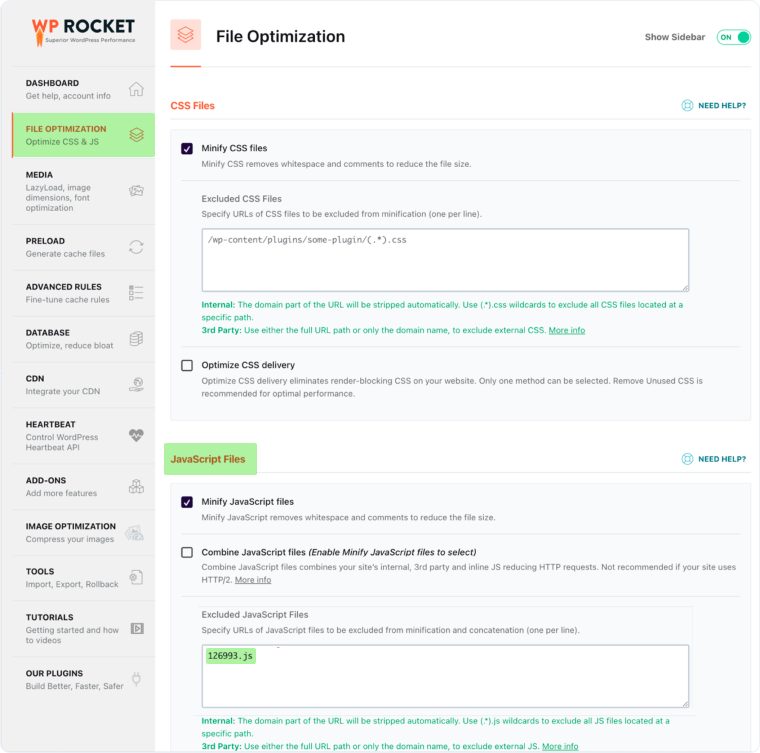
- Select "File Optimization" from the left-hand menu.
- Scroll down to the "JavaScript Files" section.
- In the "Excluded JavaScript Files" box, enter your unique Profile ID followed by .js (e.g., 126993.js).
- Repeat this exclusion for any "Load JavaScript Deferred" or "Delay JavaScript Execution" settings to ensure the WhatConverts script is not delayed.
- Click "Save Changes".
- Click "Clear Cache" at the top of your WP Rocket dashboard to apply the changes to your live site.
You are unsure which Profile ID to exclude
If you do not know your Profile ID, you can locate it directly in your WhatConverts dashboard.
How to find your Profile ID
To troubleshoot this issue:
- In WhatConverts, go to "Tracking" then select "Tracking Code".
- Locate the 5 or 6-digit number within your tracking script. This is your Profile ID.
- Return to WP Rocket and enter this number followed by .js in the "Excluded JavaScript Files" field.
Note: After making any changes in WP Rocket, always click "Clear Cache" to ensure the updated settings are applied to your live site. Changes will not take effect until the cache is cleared.
Related Topics
Get a FREE presentation of WhatConverts
One of our marketing experts will give you a full presentation of how WhatConverts can help you grow your business.
Schedule a Demo






