















































Understand Call Flows
Call Flows in WhatConverts define how inbound calls are routed through menus, schedules, geo‑routes, messages, and more. Understanding the step types and settings helps you design flows that match your business process and optimize caller experience.
Why Call Flows Matter?
Call Flow steps control how calls are handled at every stage, from the first ring to voicemail or routing to a specific department. Proper configuration ensures:
- Calls reach the right team efficiently.
- Important lead data is captured correctly.
- After‑hours, geo‑routing, and campaign-specific rules behave as intended.
- Callers have a smooth experience and don’t drop off.
Mis‑configured steps can result in missed calls, incorrect routing, or lost lead data.
Call Flow Steps
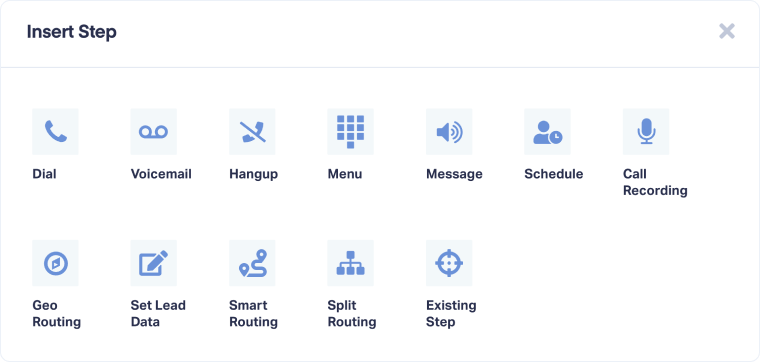
1. Dial Step
- Purpose: Connect calls to destination numbers.
- Use case: Routing calls to sales, support, or external teams.
For more information on Dial Steps, see Configure a Dial Step in a Call Flow.
2. Voicemail Step
- Purpose: Record voicemails when calls are unanswered.
- Use case: After-hours calls or missed calls.
For more information on Voicemail Steps, see Configure a Voicemail Step in a Call Flow.
Tip: When choosing the Voicemail step, keep in mind the Timeout in any of your Dial steps. If you have a destination phone that has voicemail set up, you will want to make sure that the timeout duration is shorter than how long it takes for your destination phone to go to voicemail.
For example, if your personal voicemail is set to begin after ringing for 30 seconds with no answer, you'll want to make sure the timeout in your dial step is between 20 and 29 seconds to ensure the call reaches your WhatConverts voicemail step instead of your personal voicemail.
3. Hangup Step
- Hangup Step: End the call flow.
- Use case: End the call after a final message or completion step.
For more information on Hangup Steps, see Configure a Hangup Step in a Call Flow.
4. Menu Step
- Purpose: Interactive IVR menu for caller navigation.
- Use case: Multi-department routing (Sales, Support, Billing).
For more information on Menu Steps, see Configure a Menu Step in a Call Flow.
5. Message Step
- Purpose: Play automated messages.
- Use case: Announcements, disclaimers.
For more information on Message Steps, see Configure a Message Step in a Call Flow.
6. Schedule Step
- Purpose: Route calls based on day/time.
- Use case: Separate business hours vs after-hours routing.
For more information on Schedule Steps, see Configure a Schedule Step in a Call Flow.
7. Call Recording Step
- Purpose: Enable/disable call recording and set a greeting.
- Use case: Record calls for quality assurance, compliance, or performance reviews; play a short greeting to inform callers that the call may be recorded.
Tip: Ensure proper consent if recording calls in regulated regions.
For more information on Call Recording Steps, see Configure a Call Recording Step in a Call Flow.
8. Geo‑Routing Step
- Purpose: Route calls based on the caller’s location.
- Use case: National or international routing.
For more information on Geo-Routing Steps, see Configure a Geo Routing Step in a Call Flow.
9. Set Lead Data Step
- Purpose: Assign lead data such as (Quote Value, Sales Value, Quotable Status, or Custom Fields) based on the step of the Call Flow.
- Use case: Automatically tag or set data on leads depending on where they are in the flow (e.g., “Support Call,” “High-Value Campaign”).
For more information on Set Lead Data Steps, see Configure a Set Lead Data Step in a Call Flow.
10. Smart Routing Step
- Purpose: Advanced routing based on specific data points from incoming calls.
- Use case: Route paid vs organic leads differently; prioritize high-value campaigns.
For more information on Smart Routing Steps, see Configure a Smart Routing Step in a Call Flow
11. Split Routing
- Split Routing Step: Split calls to different routes based on availability or distribute them equally.
- Use case: Distribute calls evenly between multiple sales teams or call centers.
For more information on Split Routing Steps, see Configure a Split Routing Step in a Call Flow
12. Existing Step
- Existing Step: Connect the end of one step to the beginning of another step.
- Use case: Reuse a step (like a Dial step) without recreating it.
For more information on Existing Steps, see Use an Existing Step as the Next Step in a Call Flow
13. Disconnect Step
- Disconnect Step: Disconnect steps if you need to reorganize them.
- Use case: Reorganize call flows by removing unneeded or outdated steps.
Best Practices & Considerations
- Map your call routing logic before building the flow.
- Keep flows simple (3-5 steps are ideal for most use cases).
- Test every branch: menus, schedules, fallback routing, voicemail.
- Name each step descriptively (e.g., “Dial - Sales East”).
- Review compliance requirements for call recording and messages.
- Update flows regularly for business changes (holidays, new departments, geographic expansion).
Scenario Use Cases
Scenario 1: Multi-Department Company
Sales, Support, and Billing departments use a Menu Step to route calls, a Schedule Step for business hours, and Voicemail Step for after-hours.
Scenario 2: Regional Routing
Calls from Canada are routed to the Canadian team via Geo-Routing Step; all others are routed to the default team.
Scenario 3: High-Value Campaign Routing
Paid search leads use Smart Routing to reach senior sales, while organic leads go to the standard queue.
Related Topics
Get a FREE presentation of WhatConverts
One of our marketing experts will give you a full presentation of how WhatConverts can help you grow your business.
Schedule a Demo






