


Track Bing & Yahoo Ads
Once you've connected WhatConverts to Bing Ads, you need to enable tracking on your website to capture detailed attribution data from Bing and Yahoo search campaigns. By enabling auto-tagging in Microsoft Advertising, WhatConverts can automatically track campaigns, ad groups, and keywords for every lead.
Learn more in What is the Bing Ads Integration?
How It Works
Auto-tagging adds UTM parameters to your destination URLs automatically, allowing WhatConverts to capture detailed attribution data for every visitor from Bing and Yahoo Ads. This data is essential for understanding which campaigns, ad groups, and keywords drive your best leads.
For phone call tracking, you'll also need a Dynamic Number Pool to ensure calls are properly attributed to your Bing campaigns. A Dynamic Number Pool assigns unique tracking numbers to visitors based on their traffic source, enabling accurate keyword-level attribution for phone calls.
Track Bing & Yahoo Ads Campaigns
To track Bing and Yahoo Ads with WhatConverts:
- Enable auto-tagging in Microsoft Advertising: Follow the instructions in Set Up Auto-Tagging and Pass Keyword Data from Bing Ads.
- Set up a Dynamic Number Pool (for phone call tracking): Create an All Traffic Dynamic Number Pool or an All CPC Traffic pool to track phone calls back to specific Bing Ads keywords and campaigns.
- Verify tracking is working: Use the Simulate Bing Ads Clicks test to confirm attribution data is flowing correctly.
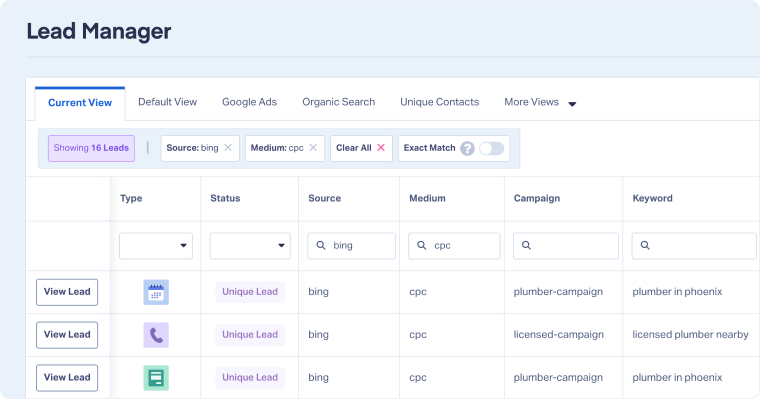
Once auto-tagging is enabled, WhatConverts will automatically capture the following parameters from Bing and Yahoo Ads:
- Source: Reported as "bing"
- Medium: Reported as "cpc"
- Campaign: The Campaign Name that triggered the ad click
- Content: The Ad Group Name that triggered the ad click
- Term (Keyword): The Keyword that triggered the ad click
These parameters allow you to track performance at the keyword level, identify your best-performing campaigns, and send high-quality conversions back to Bing Ads for optimization.
Related Topics
Get a FREE presentation of WhatConverts
One of our marketing experts will give you a full presentation of how WhatConverts can help you grow your business.
Schedule a Demo






