


Manage Recording Storage
In WhatConverts, Recording Storage controls how long call recordings are kept and allows you to permanently delete recordings across your organization or for a single profile.
You can manage recording storage and retention at two administrative levels:
- Organization Level: Sets retention rules or deletes recordings across all profiles in your organization.
- Profile Level: Sets retention rules or deletes recordings for a single profile.
Access Recording Storage Settings
Option 1: Organization Level
- Click the menu icon (☰) in the top-left corner to open the Control Center.
- Click on your Organization.
- Under Organization Settings, select "Additional Settings".
- Click "Recordings".
Option 2: Profile Level
- Click the menu icon (☰) in the top-left corner to open the Control Center.
- Click on your Profile.
- Under Profile Settings, select "Additional Settings".
- Click "Recordings".
Set Recording Retention Duration
Define how long call recordings remain stored before they are automatically removed:
- Under the Set Recording Storage section, locate the dropdown menu labeled:
- Organization level: "How long should call recordings be stored? (Applies to all profiles)"
- Profile level: "How long should call recordings be stored?"
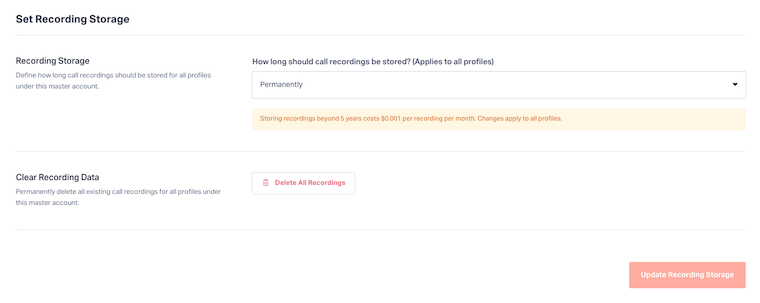
- Select your preferred retention window:
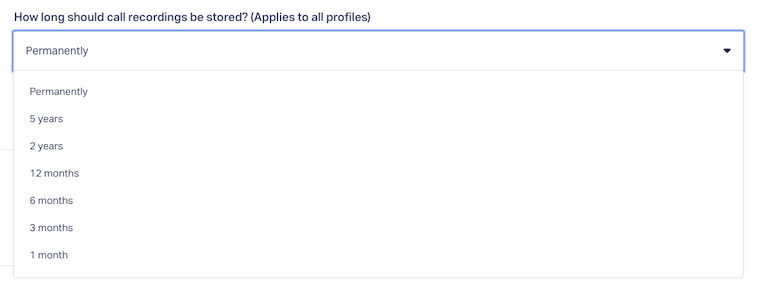
- Click "Update Recording Storage" in the bottom-right corner to save your changes.
Note:
- Price: $0.001 per recording per month
- No charge for recordings less than 5 years old
- Control settings at the Master Account or Profile level
Delete Existing Recording Data
You can submit an in-app request to delete recordings across your profiles:
- Go to the Clear Recording Data section.
- Click "Delete All Recordings".
- In the Request Deletion of All Recordings modal, review the notice:
- Organization Level: Submits a deletion request for all recordings across all profiles in the organization.
- Profile Level: Submits a deletion request for all recordings belonging to this profile only.
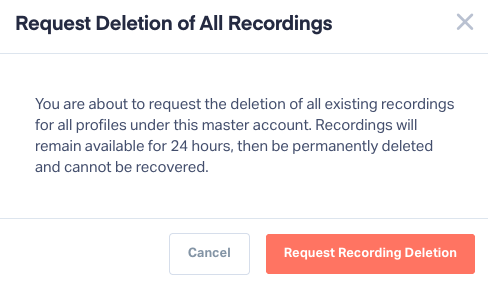
- Click "Request Recording Deletion" to confirm.
Note: Recordings are deleted permanently after 24 hours, but your lead details and attribution remain in your account.
Related Topics
Was this page helpful?
Get a FREE presentation of WhatConverts
One of our marketing experts will give you a full presentation of how WhatConverts can help you grow your business.
Schedule a Demo


