


Add an Organization User
Organization Users have access to all accounts within the Organization. Here's how to add a new Organization User to give access to manage all accounts within an Organization.
Add a New Organization User
From the Organization:
- Open the Organization Settings. Select "Users & Access".
- Select "Organization Users & Access".
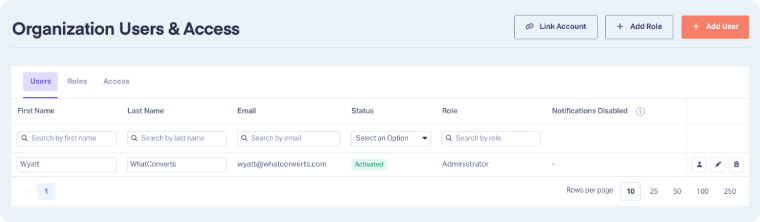
- Click "+ Add User".
- Enter the user's first name, last name, and email address.
- Select a User Role and click "Continue".
- Choose the notifications the user should receive for any new accounts that may be created under the Organization.
- Click "Continue".
- Choose the notifications the user should receive for current accounts under the Organization.
- Click "Create User" to confirm. The user will receive an activation email to get started.
Note: Once the Organization User is created, an activation email will be sent to the provided email address. The user must confirm this activation email before they can log in and use WhatConverts.
Note: The email address used to sign up for your WhatConverts account is automatically set as an Organization User with the Owner role (full permissions).
Edit an Organization User
From the Organization, Organization Owners and Administrators can update an Organization User:
- Go to Organization Settings and click "Users & Access".
- Select "Organization Users & Access".
- In the Users tab, click "Edit User" next to the user you want to update.
- Make your changes and click "Save User".
Note: Only Owners and Admins can edit an Organization User.
Delete an Organization User
From the Organization, Organization Owners and Administrators can delete an Organization User when access is no longer needed:
- Go to Organization Settings and click "Users & Access".
- Select "Organization Users & Access".
- In the "Users" tab, click "Delete User" next to the user you want to remove.
- Click "Delete User" to confirm.
Note: Only Owners and Admins can delete an Organization User.
Related Topics
Get a FREE presentation of WhatConverts
One of our marketing experts will give you a full presentation of how WhatConverts can help you grow your business.
Schedule a Demo


