


Manage Your Organization
Managing Organizations lets you oversee multiple accounts under one organization. From here, you can update your business name, select a plan type, and manage account access. While Agency plans include unlimited Accounts, which is ideal for managing multiple clients, Organization management is available for all plan types.
Manage Your Organization
Manage your Accounts to organize and oversee multiple Profiles under one structure, adjust account details, and control user access or billing settings.
- Open the Organization Settings. Select "Manage Accounts".
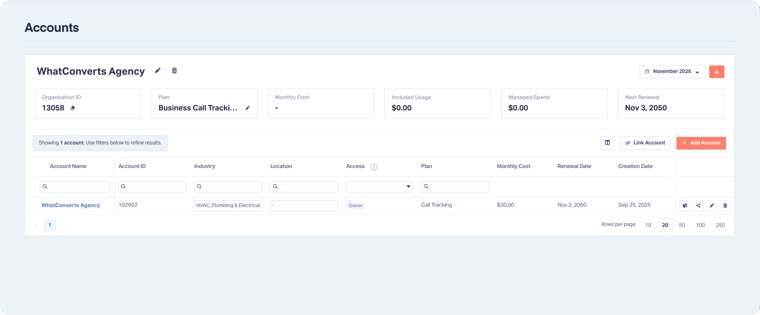
- From this page, you can:
- Check the Organization information in the top panel, which includes:
- Monthly Cost: How much your Organization or Accounts cost on the Renewal Date.
- Included Usage: How much monthly credit we apply to the account. This refills on the Renewal Date.
- Renewal Date: When you are charged your Monthly Cost for your plan.
- Creation Date: When you created your Organization.
- Edit Organization: Select the Edit Organization to change the Organization name and choose an Agency Plan.
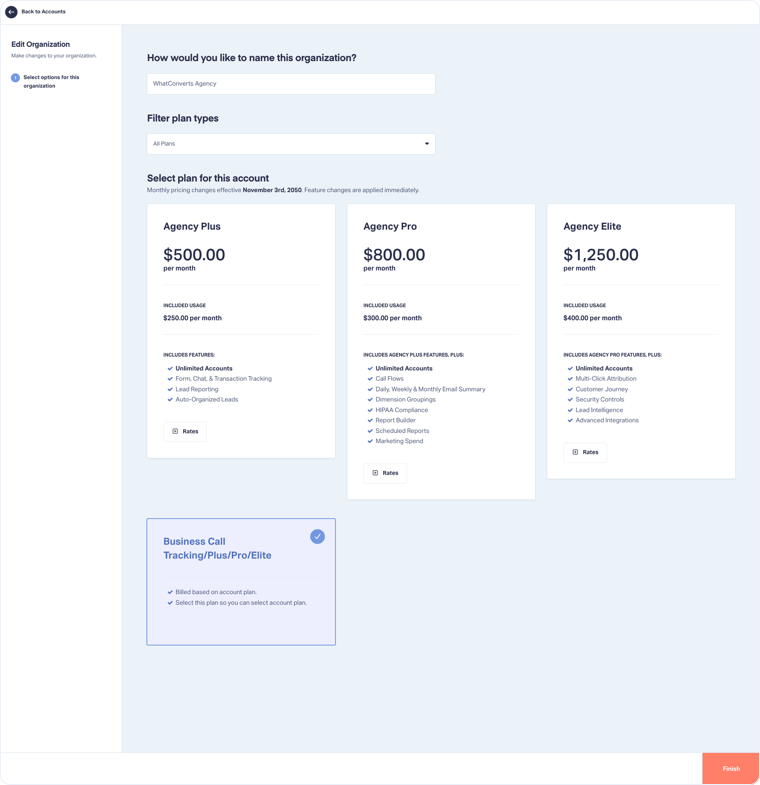
- Check the Organization information in the top panel, which includes:
- Delete Organization: Click "Delete Organization" to cancel or downgrade your Organization if you want to stop using WhatConverts.
Note: Learn more about how to cancel or downgrade your Organization if you are on an Agency plan or on an Individual Business plan.
Related Topics
Was this page helpful?
Get a FREE presentation of WhatConverts
One of our marketing experts will give you a full presentation of how WhatConverts can help you grow your business.
Schedule a Demo


