


Trigger a Zap from an Updated Lead in WhatConverts
The "Updated Lead" trigger allows you to start Zapier workflows automatically when any field on an existing lead is updated in WhatConverts. Use this trigger to sync lead updates to your CRM, notify teams when sales values are added, or automate follow-up actions when lead status changes.
Learn more in What is the Zapier Integration?
How It Works
The Updated Lead trigger monitors your WhatConverts account for changes to existing leads. Any update to any field, such as adding a sales value, changing lead status, updating custom fields, or marking a lead as quotable, will trigger your Zap and send the updated lead data to your connected apps.
Set Up the Updated Lead Trigger
Follow these steps to use the Updated Lead trigger in your Zap:
- Log in to your Zapier account.
- In the left-hand menu, click "+ Create", then click "Zaps".
- Use the AI Copilot to enter the integration you are setting up, or click the Trigger Box and search for "WhatConverts".
- Choose WhatConverts as the Trigger app.
- Select "Updated Lead" as the Trigger Event.
- Click "Continue”.
- Connect your WhatConverts account by following the prompts (see Connect WhatConverts to Zapier for detailed instructions).
- Configure which lead types should trigger the Zap:
- Web Form
- Phone Call (Completed, Modified, or In Progress). Select which phone call type to use. Most cases will use the Completed Phone Call.
- Chat (Completed, In Progress). Same as Phone Call.
- Transaction
- Appointments
- Text Messages
- Custom Events
- Others
- Select your Profile from the Profile (required) dropdown menu.
- Click “Continue”.
- Click “Test Trigger” to pull in sample updated leads from your WhatConverts account.
- Select a lead from the samples and click “Continue”.
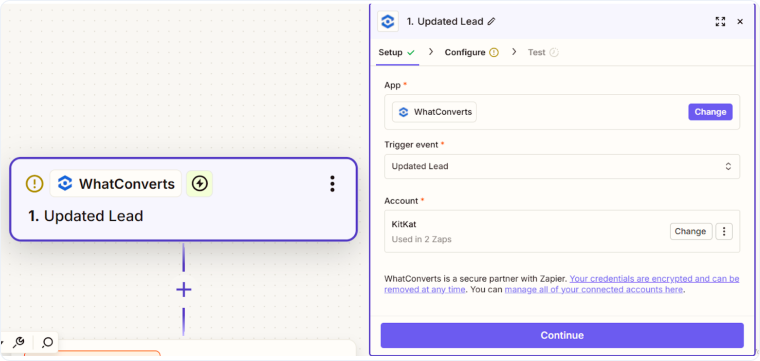
Once the trigger is set up, you can add action steps to sync the updated data to other apps, send notifications, or perform any automated workflow based on the lead changes.
Common Use Cases for the Updated Lead Trigger
- Sync sales values to your CRM: When a sales value is added in WhatConverts, automatically update the deal value in Salesforce, HubSpot, or Pipedrive.
- Notify teams of won deals: Send Slack or email notifications when a lead status changes to "Closed Won".
- Update marketing platforms: When leads are marked as quotable, add them to email nurture sequences or update contact properties.
- Track lead progression: Log status changes in Google Sheets or project management tools for reporting and analysis.
- Trigger follow-up workflows: When custom fields are updated (e.g., appointment scheduled), create tasks or send reminders to your team.
Related Topics
Get a FREE presentation of WhatConverts
One of our marketing experts will give you a full presentation of how WhatConverts can help you grow your business.
Schedule a Demo






